




eXgine is the specialist foreign exchange company within QashPay — available exclusively to eligible QashPay merchants.
How it works

You set two things.
We handle everything else.

Tell us your settlement currency and the markets you sell in. QashPay opens the local accounts, enables the right methods and routes the payments; eXgine fixes every qualifying rate and settles you back in your own currency — no integration, no dev time, no FX desk.

Inside the platform

FX automation inside the QashPay platform

eXgine provides the specialist foreign exchange layer used within supported QashPay Multi-Currency Processing. Every currency conversion booked against a merchant account is recorded as an immutable trade with eXgine — showing the base and contra currencies, the amounts dealt, the exchange rate applied and the value date. Merchants view and reconcile all of this entirely inside QashPay, with no separate eXgine integration.

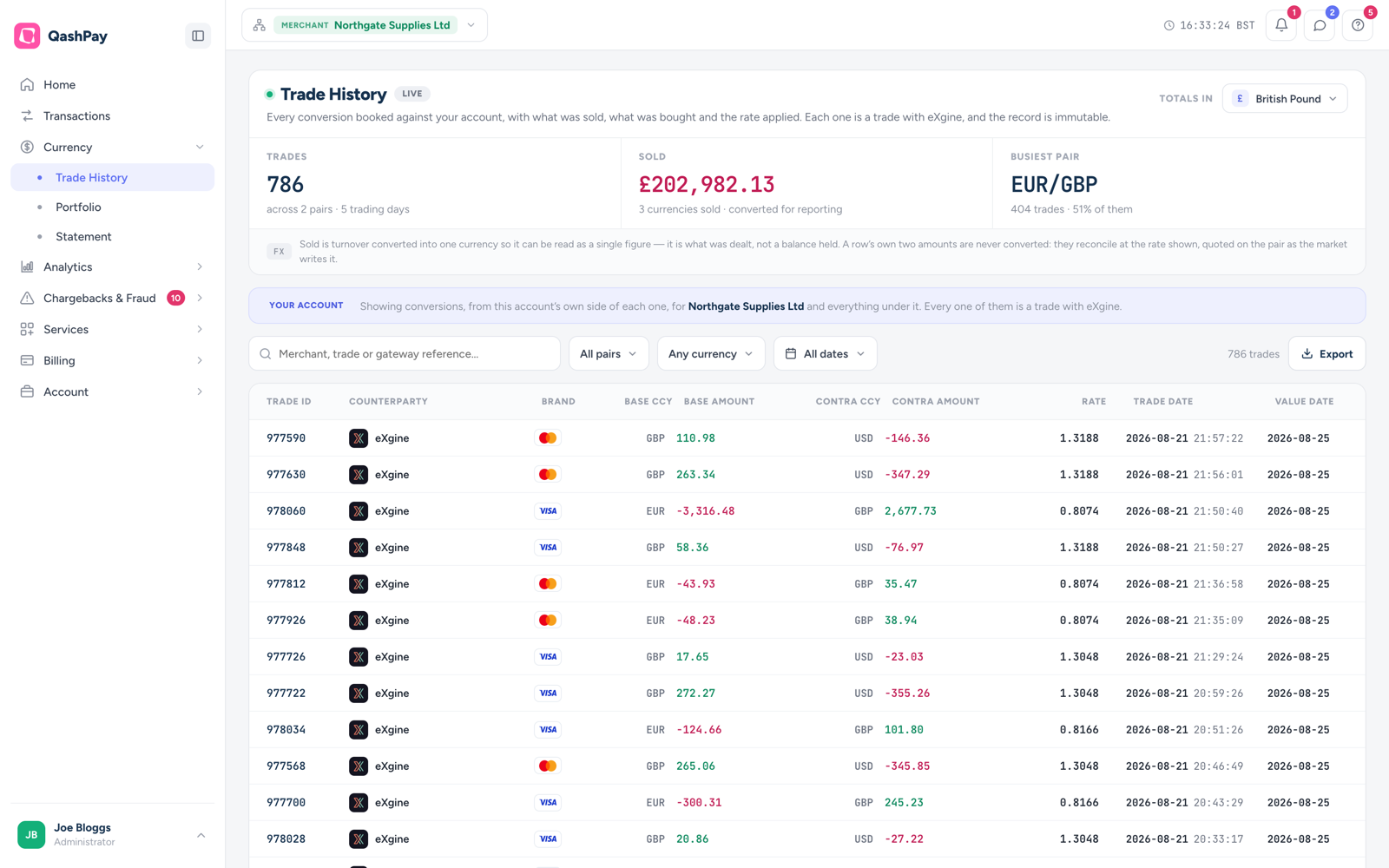
The eXgine Trade History screen inside the QashPay dashboard for merchant Northgate Supplies Ltd, summarising 786 trades across two currency pairs over five trading days with EUR/GBP the busiest pair. Every conversion booked against the account is recorded here as a trade with eXgine.
The eXgine Trade History view within QashPay. Each conversion is booked as a trade with eXgine at the exchange rate shown and settled on a defined value date — an immutable record of what was sold, what was bought and the rate applied. Available exclusively to eligible QashPay merchants.
eXgine Part of QashPay

This isn’t a separate integration. You take your website payments with QashPay — Multi-Currency Processing is simply the currency setting switched on inside it. Turn it on and QashPay handles the payments while eXgine handles the FX. Nothing else in your checkout changes.

Your part
2things to tell us
  • 1
    Your settlement currencyWhat you want to be paid in.
  • 2
    The markets you sell inThe currencies your customers pay in.

Set once, in your QashPay settings. That’s it.

eXgine + QashPay handle
Allthe rest — automatically
Open a local QashPay MID for each market
Enable the right payment methods per MID
Charge every card in the customer’s own currency
Fix the FX rate as each qualifying sale completes
Value-date each trade to your acquirer’s settlement
Settle you back in your own currency
Reconcile every trade with card and MCP references
Take the other side of each qualifying trade

A settings changeNo integration, no dev time and no FX desk — timings depend on QashPay onboarding.

Try it yourself

Set your two inputs — see the shape of the answer.

Pick a settlement currency and the markets you sell in. This is the choice QashPay puts in front of you at onboarding, and it is the whole of your part.

1

Your settlement currency

The one currency you want to be paid in. eXgine converts every qualifying sale back to it.

2

Your customer markets

The currencies your customers pay in. QashPay opens a local merchant account for each one it can, so cards are charged in the customer’s own currency.

3

Payment methods that could apply

Each method settles on its own schedule. The value date sits one business day after the rail settles.

  • MastercardCards EUR · USD · AUD T+1Rail settles
  • VisaCards EUR · USD · AUD T+2Rail settles
  • American ExpressCards EUR · USD T+2Rail settles
  • Apple PayWallet EUR · USD · AUD T+3Rail settles

Illustrative. This shows the shape of the choice you are given, not a quotation. Your real options are resolved by QashPay against the configuration held for each payment brand on each connected provider — a provider may have far fewer currencies enabled than the brand supports. Settlement schedules shown are examples.

The flow

How a sale flows

Two moments. The rate is fixed the instant the qualifying sale happens; the money moves later, on the value date.

At the sale · real-time

  1. 01Customer checks out in their own currency

    QashPay routes the card to the local MID it has opened for that currency, so the card is charged in the currency the customer expects to see.

  2. 02QashPay notifies eXgine

    The completed transaction is passed to eXgine with its amount, its processing currency and the merchant account it was taken on.

  3. 03The rate is fixed and the trade is value-dated

    eXgine fixes the rate from the base currency to your settlement currency, books the trade and sets its value date — typically one business day after the acquirer settles.

At settlement · value date

  1. 04The acquirer settles to you

    You receive the sale-currency funds on your normal schedule. Card acquiring and settlement are provided by your acquirer, not by eXgine.

  2. 05The sale-currency funds move to eXgine

    The currency you took the sale in passes on to eXgine as the other side of the booked trade.

  3. 06eXgine sends your settlement currency

    At the rate fixed back at the sale, on the trade’s value date.

Follow the money
Acquirer → Yousettles the sale currency
You → eXgineyou send the sale currency
eXgine → Yousends your currency · fixed

The rate is fixed at the sale. The money moves on the value date — typically one business day after the acquirer settles — so that, where the FX and settlement flow completes as configured, you are not left holding an open position in between.

The ledger

Conversions and the money that settled them

Those two moments show up as separate lines. The conversions booked against your account are one kind of entry; the cash arriving or leaving on the value date is another. Because both sit in the same dated ledger, you can see which settlement paid for which day’s conversions rather than inferring it.

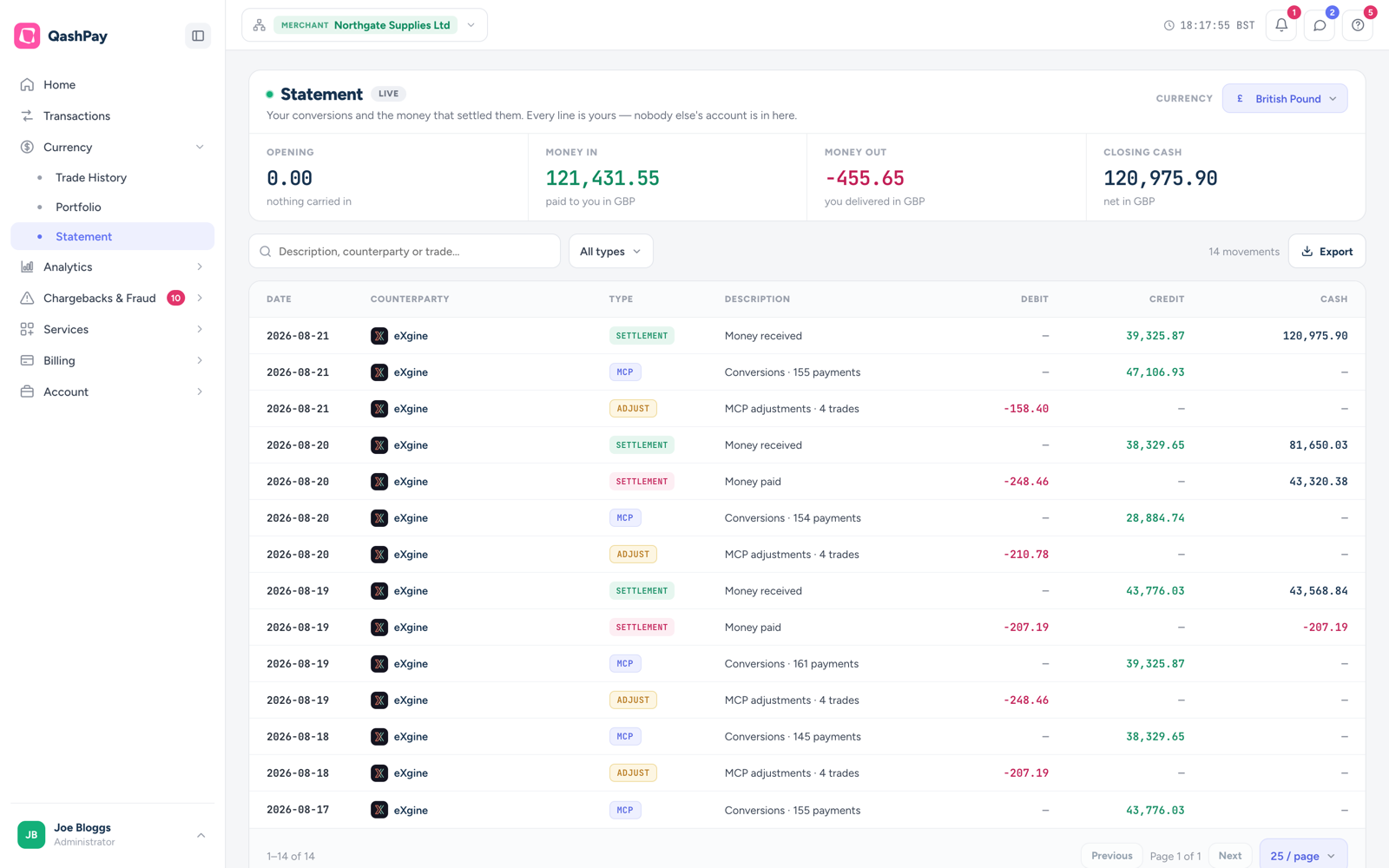
The eXgine Statement screen in QashPay, setting a merchant's conversions beside the money that settled them: opening balance, money in, money out and closing cash, above a dated ledger of settlement, MCP conversion and adjustment entries.
The eXgine Statement view in QashPay — a merchant’s conversions beside the money that settled them. MCP lines are the conversions booked for a day, settlement lines are the cash received or paid, and adjustment lines are corrections to booked trades. Each carries its own date, so a conversion and the settlement that answers it stay separately visible on either side of the value date.
Your position

What the netting actually looks like

Selling in several currencies means holding several balances. The Portfolio view sets them side by side on the day they settle — which currency you are short, which you are long, and how much of the book each one accounts for — so the position is something you can look at rather than something you have to take on trust.

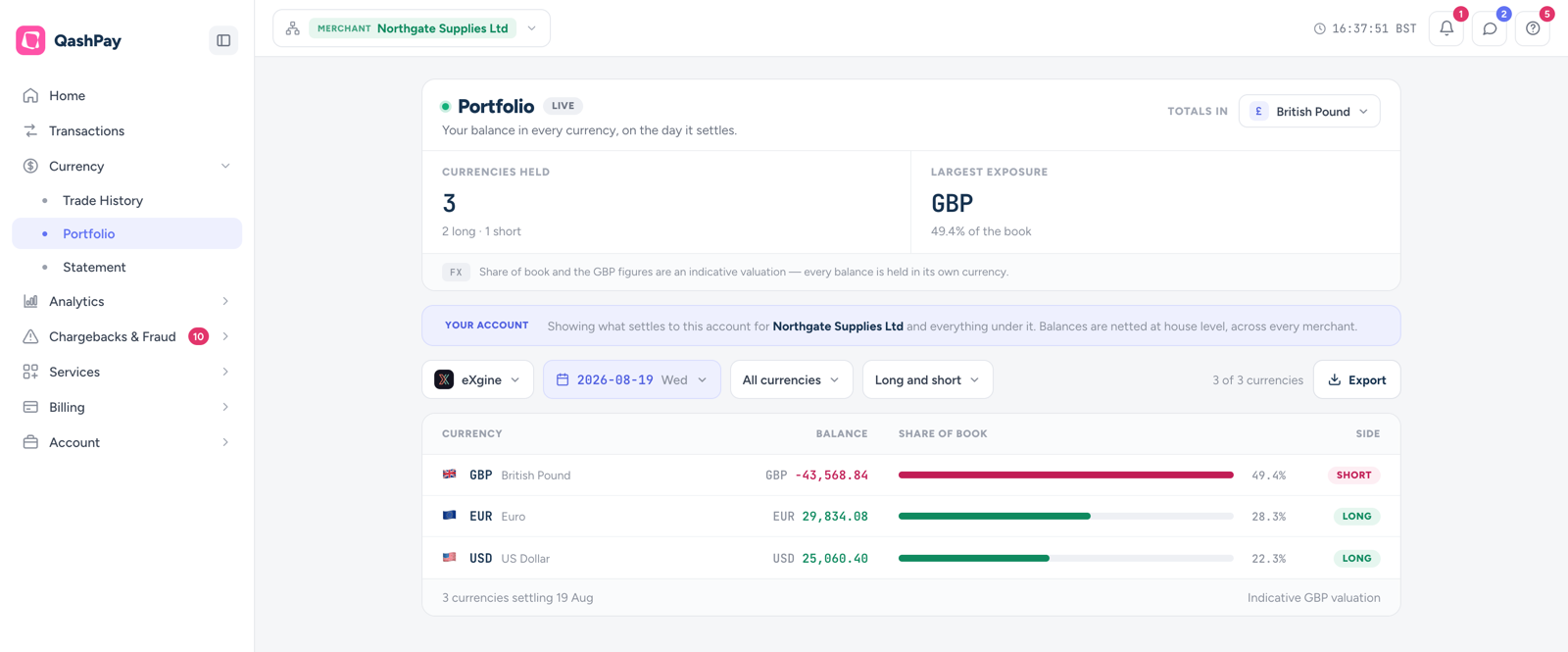
The eXgine Portfolio screen in QashPay, showing a merchant's balance in every currency on the day it settles: three currencies held, two long and one short, with GBP the largest exposure at 49.4 per cent of the book.
The eXgine Portfolio view in QashPay — a merchant’s balance in every currency on the day it settles. Three currencies are held: one short and two long, each with its share of the book, all settling on the same value date. Balances are netted at house level across every merchant, and each one is held in its own currency — the share and any sterling figure are an indicative valuation only.
Division of responsibility

Who does what.

eXgine provides the foreign exchange component only. It is worth being precise about where the boundary sits, particularly if you are assessing this on behalf of a bank or an acquirer.

QashPay provides

  • The payment platform, checkout and merchant dashboard
  • Local merchant accounts for each processing currency
  • Merchant eligibility, onboarding and due diligence
  • The configuration that determines which transactions qualify
  • The commercial relationship with you

eXgine provides

  • The exchange rate fixed against each qualifying transaction
  • The booked trade, its base and contra currency and its value date
  • The conversion into your settlement currency on the value date
  • The trade records used for reconciliation and audit
Card acquiring and settlement are provided by others. eXgine is not an acquirer and does not provide banking, merchant settlement or payment accounts. It supplies only the foreign exchange leg described above. See Compliance for the detail banks and acquirers usually ask for.
In plain terms

Common questions about the flow.

What is the difference between eXgine and QashPay?

QashPay is the payment platform: it takes the payment, holds the merchant accounts and settles funds. eXgine is the specialist foreign exchange company within QashPay: it fixes the exchange rate on qualifying transactions and converts them into your settlement currency. You reach eXgine through QashPay; there is no separate eXgine integration.

When is the exchange rate fixed?

The rate is fixed at the point the qualifying transaction is processed, not at the point the acquirer settles. The resulting trade is given a value date aligned to your settlement schedule, so the conversion and the money movement line up.

Do I need to change my checkout or integrate anything?

No. Multi-Currency Processing and eXgine FX are configured inside your existing QashPay account by QashPay, subject to eligibility. There is no eXgine API for merchants to build against.

What is a value date?

The value date is the date on which the two sides of a foreign exchange trade actually settle. eXgine sets it in line with your acquirer’s settlement schedule so that the currency you owe and the currency you receive move on aligned dates.

Which currencies can I sell in?

The available processing currencies depend on the local merchant accounts QashPay can open for your business, which varies by acquirer, region and merchant category. Your QashPay contact can confirm what is available to you.

Is this Dynamic Currency Conversion?

No. Dynamic Currency Conversion offers the cardholder a conversion at the checkout. Multi-Currency Processing charges the cardholder in their own currency on a local merchant account, and the conversion happens afterwards between that account and your settlement currency. The cardholder is never shown an eXgine rate.

See it applied to real screens.

The Multi-Currency Processing page walks through merchant configuration, transaction-level FX and reconciliation using captures of the live platform.