eXgine is the specialist foreign exchange company within QashPay — available exclusively to eligible QashPay merchants.
Multi-Currency Processing

What is Multi-Currency Processing?

Multi-Currency Processing (MCP) lets an eligible QashPay merchant charge each customer in their own currency, then settle back to the merchant’s chosen currency at an automatically fixed exchange rate. QashPay opens a local merchant account (MID) for each supported currency; eXgine provides the specialist foreign exchange that fixes each qualifying transaction back to the merchant’s settlement currency.

MCP is configured and accessed entirely through QashPay. There is no separate eXgine integration.

Multi-Currency Processing compared with a single merchant account

Without MCP

One MID, foreign cards forced to convert

  • A USD card on a EUR MID is converted by the issuer at a poor rate.
  • Cross-currency authorisations are declined more often — lower success rate.
  • The cardholder’s statement shows a different amount — chargeback risk.
  • The merchant carries the currency exposure until the acquirer settles.
With eXgine MCP

A local account per currency, FX fixed automatically

  • QashPay opens a local MID per currency — cards are charged in the customer’s own currency.
  • Can improve acceptance by reducing unnecessary cross-currency processing, with matching statements and fewer currency-related chargebacks.
  • eXgine fixes the rate back to the settlement currency, value date after the acquirer settles.
  • Designed to reduce or remove the merchant’s transactional FX exposure where the FX and settlement flow completes as configured — and it is not DCC: nothing is converted at checkout.

Why does each currency need a local MID?

If a card is routed to a mismatched merchant account, the issuer or scheme may convert it at a poor rate, can be more likely to decline it, and the cardholder may see a different amount on their statement — which can contribute to chargebacks. A local MID in the customer’s currency can improve acceptance by reducing unnecessary cross-currency processing, and helps keep statements accurate.

Is MCP the same as Dynamic Currency Conversion?

No. Dynamic Currency Conversion converts and shows the cardholder a rate at checkout — usually a poor one. MCP charges the cardholder in their own currency on a local account; the conversion happens on the back end, between the merchant’s currencies and their settlement currency. The customer is never shown an eXgine rate.

How does MCP manage FX exposure?

The rate is fixed at the point of sale and the value date is aligned to the merchant’s settlement. Where the FX and settlement flow completes as configured, this is designed to prevent the merchant being left with an open transactional FX position.

What happens to the FX if a sale is refunded or charged back?

The conversion is reversed at the rate originally fixed, not at the rate on the day of the refund. A refund or a chargeback unwinds the trade that was booked against the sale rather than opening a new one at whatever the market has moved to, so a rate that has moved in between does not change what comes back. Where the FX and settlement flow completes as configured, this is what stops a refund becoming a separate foreign exchange event.

How is MCP accessed?

MCP is available only to eligible QashPay merchants and is configured within the QashPay platform. There is no separate eXgine integration, product or account — the FX component is provided by eXgine and accessed entirely through QashPay.

Currencies

Which currencies can I sell and settle in?

There is no single list, and that is the accurate answer rather than an evasive one. Availability is set per payment brand, per provider — and you do not have to work it out, because QashPay resolves it for you.

180+currencies a card can be authorised in
~28a card brand can settle
Per PSPhow many of those are enabled for you
1currency you are paid in

It is set per brand, per provider

Each card brand settles in a limited set of currencies. Visa marks around 28 as settlement currencies in its published table, out of the more than 180 that VisaNet can authorise a transaction in — the exact figures vary by product and region.

That is the ceiling, not the menu. The payment service provider processing a given brand for you may have only a handful of those currencies enabled. What is actually available to you is the overlap: what the brand can settle, and what your provider has switched on for it. Two merchants on the same brand can have different options because they are on different providers.

Which is why you do not have to work it out

QashPay holds the configuration for every payment brand on every connected provider. When you onboard you choose your processing markets and the payment methods you want to offer; QashPay resolves those against the stored configuration and presents the Multi-Currency Processing options that genuinely exist for your account.

eXgine then fixes each qualifying transaction automatically, at the rate configured for that brand and provider pairing. You are choosing markets and methods, not currency pairs.

The like-for-like condition

Multi-Currency Processing applies where the settlement is like for like: the currency the customer paid in has to be one your provider can settle for that brand. Where it is not, the scheme converts the transaction before it reaches you and there is nothing left for eXgine to convert. That is the state the Configure MID dialog below marks as not ours to convert.

For reference: the outer bound

Visa’s settlement currencies include the following. Treat this as the widest the brand goes, not as a list of what you can have — your provider decides that, and other brands publish their own lists.

  • EUR
  • GBP
  • USD
  • CHF
  • SEK
  • DKK
  • NOK
  • CZK
  • PLN
  • HUF
  • RON
  • AUD
  • NZD
  • CAD
  • BRL
  • HKD
  • INR
  • ILS
  • JPY
  • MYR
  • MXN
  • SAR
  • SGD
  • ZAR
  • THB
  • TRY
  • AED
Inside QashPay

See Multi-Currency Processing in the platform

These are views from the QashPay platform where eXgine’s foreign exchange automation operates. Every screenshot reflects functionality that eligible QashPay merchants configure and use inside QashPay — merchants do not integrate with eXgine directly.

Transaction-level FX automation

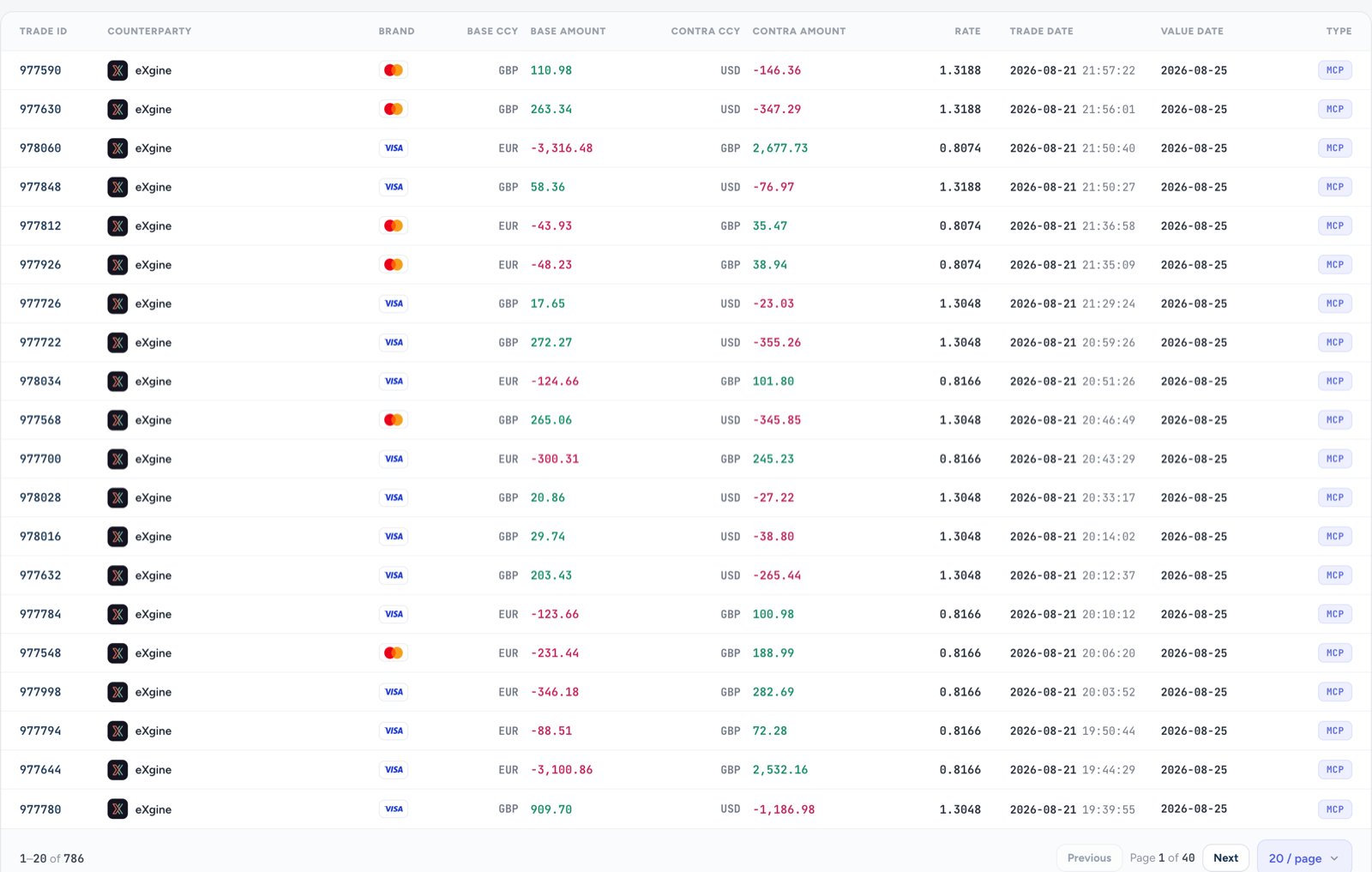
Every currency conversion booked against a merchant account is recorded as an immutable trade with eXgine. Each row shows the base and contra currencies, the amounts dealt, the exchange rate applied, the trade date and the value date — a permanent record of what was sold, what was bought and the rate used.

Transaction-level foreign exchange automation in the eXgine Trade History table: individual EUR/GBP and GBP/USD conversions, each booked against eXgine as counterparty with its own exchange rate, trade date, value date and an MCP type label.
The eXgine Trade History table in QashPay, listing each EUR/GBP and GBP/USD conversion with its base and contra amounts, the exchange rate applied, the trade date and the value date. Every row names eXgine as the counterparty and carries an MCP type label, so a single sale can be traced to the single trade that converted it.

Multi-currency merchant configuration

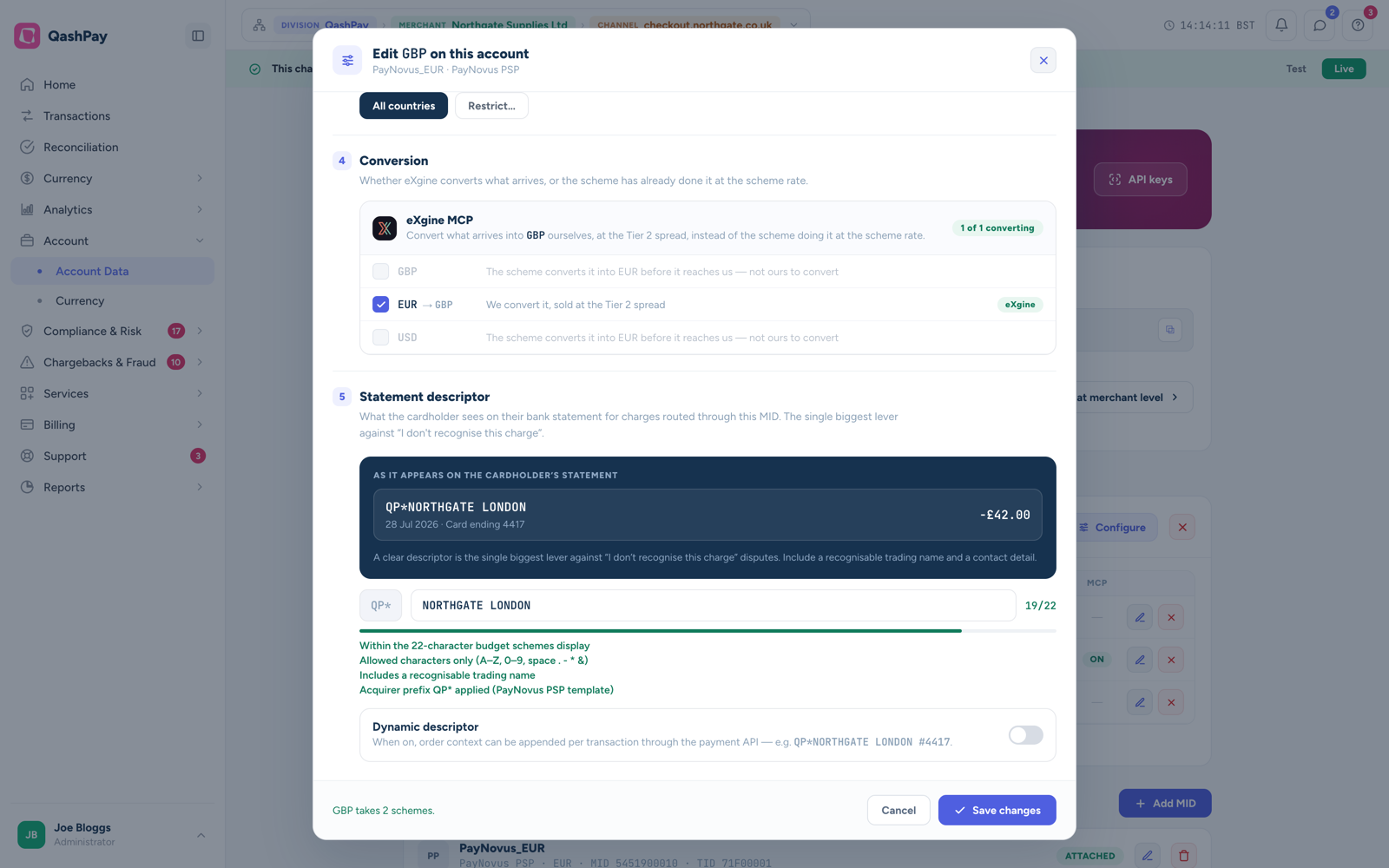
Conversion is set per merchant account (MID). A merchant can choose to have eXgine convert what arrives — for example EUR into GBP at the agreed spread — rather than letting the card scheme convert at the scheme rate. The statement descriptor the cardholder sees is configured on the same screen. Everything is set inside QashPay.

The Configure MID dialog in QashPay. Its Conversion section sets whether eXgine converts what arrives on the merchant account or the card scheme has already converted it at the scheme rate, with EUR to GBP selected for eXgine to convert. Below it, the statement descriptor section previews what the cardholder will see on their bank statement.
The Configure MID dialog in QashPay. The Conversion section decides whether eXgine converts what arrives on this merchant account or the card scheme has already converted it at the scheme rate — here EUR is set to convert to GBP at the agreed spread, while currencies the scheme has already converted are marked as not ours to convert. The statement descriptor the cardholder sees is set on the same screen, within the 22 characters the schemes display.

FX activity and reconciliation

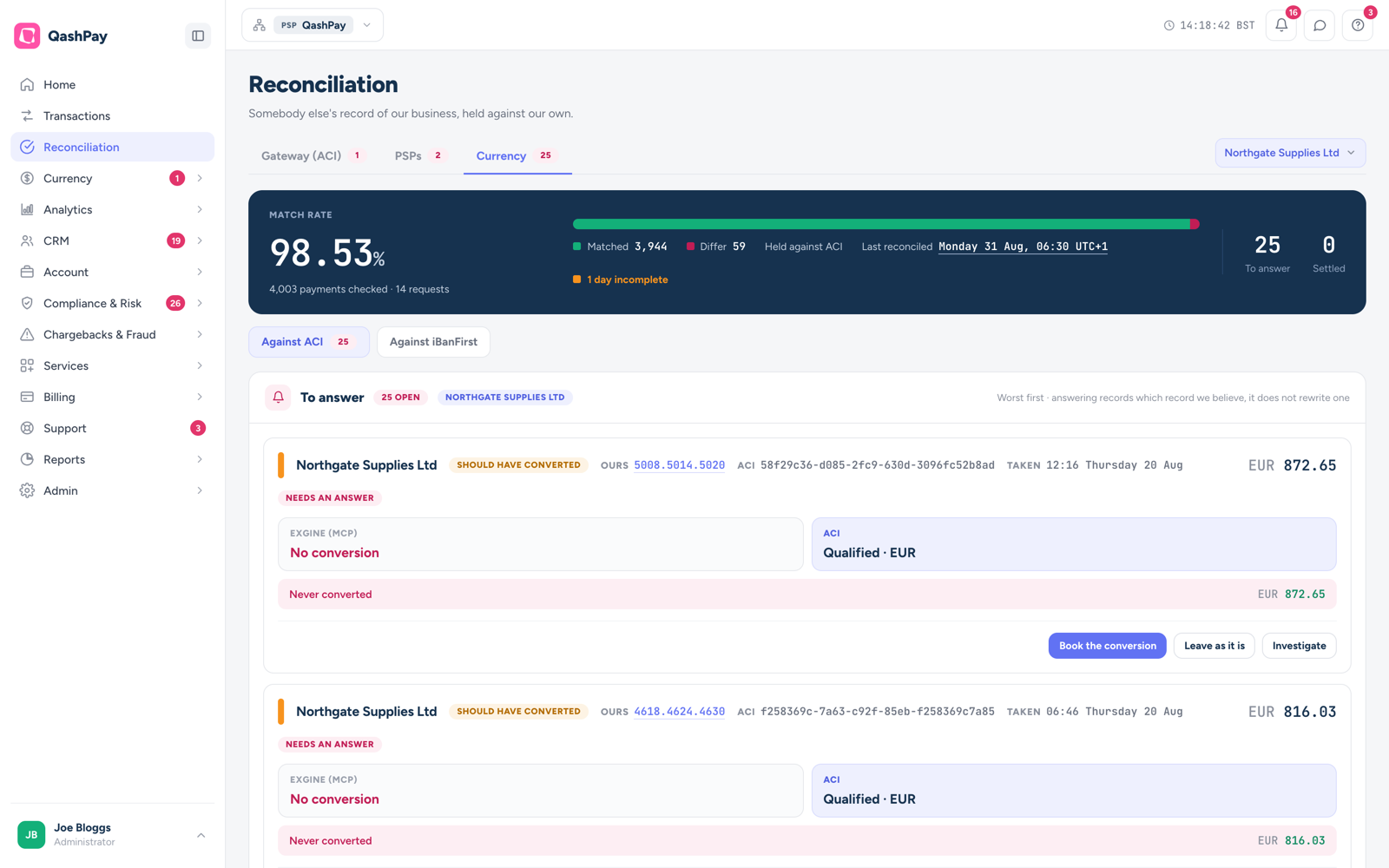
eXgine’s currency records are reconciled against the gateway and third-party records line by line. QashPay reports a match rate across every payment checked and flags the exceptions — conversions that should have been booked but were not — so each one can be resolved rather than silently rewritten.

The Currency tab of the Reconciliation screen in QashPay, showing a 98.53 per cent match rate across 4,003 payments checked, 3,944 matched against 59 differing, and 25 open items to answer, held against ACI and iBanFirst records.
The Currency tab of Reconciliation in QashPay: a 98.53% match rate across 4,003 payments checked — 3,944 matched against 59 differing. Open items are listed worst first and flagged should have converted, each showing what eXgine Multi-Currency Processing recorded beside what the gateway recorded, with the options to book the conversion, leave it as it is, or investigate. Answering a record does not rewrite it.

Onboarding and eligibility for Multi-Currency Processing are handled by QashPay.

eXgine does not onboard merchants directly. Eligibility, due diligence, account opening and the Multi-Currency Processing configuration are all handled through QashPay.